Showing posts with label InternetSoftware. Show all posts

2014 အတြက္ အလကား ရ တဲ ့ ထိပ္တန္း poxy links ( 100 )


2014 အတြက္ အလကား ရ တဲ ့ ထိပ္တန္း poxy links ( 100 ) 
===========================================
ေက်ာ္ ခြ ခ်င္ တဲ ့ က် ေန ာ ့မိတ္ ေဆြ ေတြ အတြက္ ပါ။ အလကားရတဲ ့poxy sites ေပါင္း ( 100) တိတိ ပါ။ ပိတ္ထားတဲ ့ website ေတြ ကို ဝင္ေရာက္ ၾကဖို ့ အသံုးျပဳ ၾကစို ့ေနာ္....
 Top 100 Free Proxy Sites 
  1. HideMyAss - https://www.hidemyass.com/proxy
  2. Proxify - http://proxify.com/p/
  3. Ninja Clock - http://ninjacloak.com/
  4. AnonyMouse - http://anonymouse.org/
  5. AnonyMizer - http://www.anonymizer.com/
  6. kProxy - http://www.kproxy.com/
  7. BlewPass - http://www.blewpass.com/
  8. Zfreez - http://zendproxy.com/
  9. Vobas - http://www.vobas.com/
  10. Don’t Filter - http://www.dontfilter.us/
  11. Vtunnel - http://vtunnel.com/
  12. Proxy.org - http://proxy.org/
  13. New Ip Now - http://newipnow.com/
  14. WebProxy.net - http://webproxy.net/
  15. 4everproxy - http://4everproxy.com/
  16. Unblock My Web - http://www.unblockmyweb.com/
  17. YouTube Unblock Proxy - http://youtubeunblockproxy.com
  18. Working Proxy - http://workingproxy.net
  19. Free Open Proxy - http://freeopenproxy.com
  20. Proxy 2014 - http://proxy2014.net
  21. Unblock YouTube Free - http://unblockyoutubefree.net
  22. Free YouTube - http://freeyoutube.net
  23. HideOnline Proxy - http://freeyoutube.net
  24. Rapid Proxy - http://rapidproxy.us
  25. Unblock YouTube Beat School - http://unblockyoutubeatschool.com
  26. Hiding Your Info - http://hidingyour.info
  27. Unblocker - http://unblocker.us
  28. Fast USA Proxy - http://fastusaproxy.com
  29. YouTube Free Proxy - http://youtubefreeproxy.net
  30. Proxyo - http://proxyo.info
  31. Quickproxy - http://quickproxy.co.uk
  32. Defilter - http://defilter.us
  33. Free Proxy Server - http://freeproxyserver.uk
  34. Free YouProxyTube - http://freeyouproxytube.com
  35. The Best Proxy - http://thebestproxy.info
  36. EXCS - http://ecxs.asia
  37. Just Proxy - http://justproxy.co.uk
  38. Proxy-2014 - http://proxy-2014.com
  39. VPN Browse - http://vpnbrowse.com
  40. ProxyOne - https://proxyone.net
  41. Web Proxy Free - http://webproxyfree.net
  42. Can’t Block This - http://cantblockthis.org
  43. Hide The Internet - http://hidetheinternet.com
  44. Greatest Free Proxy - http://greatestfreeproxy.com
  45. Proxay - http://www.proxay.co.uk
  46. ViewTube - http://viewyoutube.net
  47. PRO Unblock - http://pro-unblock.com
  48. Fun Proxy - https://funproxy.net
  49. Working Proxy - http://workingproxy.net
  50. Star Doll Proxy - http://stardollproxy.com
  51. HideMyAss UK - http://hidemyass.co.uk
  52. F4FP - http://f4fp.com
  53. TiaFun- http://tiafun.com
  54. Proxy 4 Freedom - http://proxy4freedom.com
  55. WebSurf Proxy - http://websurfproxy.me
  56. Fish Proxy - http://fishproxy.com
  57. DZ Hot - http://dzhot.us
  58. 1FreeProxy – http://1freeproxy.pw
  59. Sporium - http://sporium.org
  60. Saoudi Proxy - http://saoudiproxy.info
  61. Proxy Browse - http://proxybrowse.info
  62. Proxy Internet - http://proxy-internet.info
  63. Jezus Loves This Proxy - http://jezuslovesthisproxy.info
  64. German Proxy - http://german-proxy.info
  65. CA Proxies - http://caproxies.info
  66. Proxy 2015 - http://proxy-2015.info
  67. FB Proxies - http://fbproxies.info
  68. America Proxy - http://americaproxy.info
  69. PK Proxy - http://pkproxy.info
  70. Suede Proxy - http://suedeproxy.info
  71. To Proxy - http://toproxy.co
  72. PHProxy - http://phproxy.co
  73. London Proxy - http://londonproxy.eu
  74. Kr Proxy - http://krproxy.info
  75. Brazil Proxy - http://brazilproxy.info
  76. Canada Proxy - http://canadaproxy.info
  77. US Proxy - http://usproxies.info
  78. Spedo - http://spedo.co
  79. US Proxy - http://usproxy.nu
  80. You Liaoren - http://youliaoren.com
  81. Zacebook PK - http://zacebookpk.com
  82. Proxys - http://proxys.pw
  83. Justun Block IT - http://justunblockit.com
  84. Network ByPass - http://networkbypass.com
  85. Go Proxy - http://goproxy.asia
  86. Proxy This - http://proxythis.info
  87. Me Hide - http://mehide.asia
  88. Zalmos - http://zalmos.com
  89. kProxy Site - http://kproxysite.com
  90. Xite Now - http://xitenow.com
  91. Hidden Digital - http://hiddendigital.info
  92. Surf For Free - http://surf-for-free.com
  93. Intern Cloud - http://interncloud.info
  94. Singapore Proxy - http://singaporeproxy.nu
  95. PRO Intern - http://prointern.info
  96. Fast Time - http://fasttime.info
  97. Work Host - http://workhost.eu
  98. Travel VPN - http://travelvpn.info
  99. Proxy Call MeNames - http://proxmecallmenames.com
  100. Host App - http://hostapp.eu


အသစ္တင္တိုင္း facebook ကေန ဖတ္မယ္ဆို ရင္ ဒီမွာ like လုပ္ေပးပါ။
စိုင္းသူ(နည္းပညာ ျပန္လည္မ်ွေဝ ျခင္း )

၁၀ မိနစ္အတြင္း Facebook အလြယ္ဖြင့္နည္း ( Code မေတာင္းပါ )


 Image result for Facebook icon
ဒီနည္းကို မေန႔ကတည္းက ေျပာျပခ်င္ေနခဲ့တာပါ.. ကၽြန္ေတာ္လည္း ညီးေလးတစ္ေယာက္ ေျပာျပလို႔ လုပ္ၾကည့္တာ. ခဏေလးပဲၾကာတယ္.. လုပ္နည္း ၾကည့္ရေအာင္..
ပထမဆံုး ကိုယ့္မွာ Facebook Account မဖြင့္ရေသးတဲ့ Gmail သစ္ တစ္ခု ရွိထားရပါမယ္..  မရွိရင္ Gmail အျမန္ဖြင့္နည္း ေျပာျပပါမယ္..
1. ဖုန္းမွာ Chrome Browser ရွိရပါမယ္.. အျခား Browser ေတြက အခ်ိန္ၾကာၿပီး အဆင္မေျပတာ မ်ားလို႔ပါ.. မရွိရင္ ေအာက္မွာ ေဒါင္းၿပီး Install လုပ္လိုက္ပါ..

Chrome Browser :
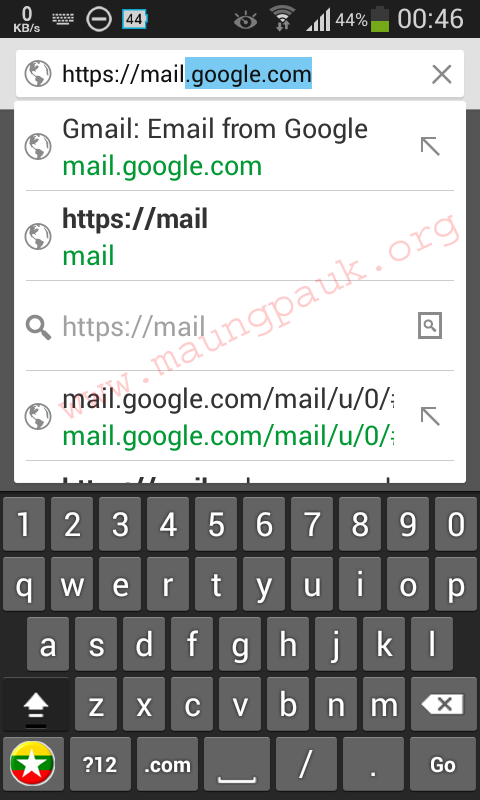
2. ဖုန္း အင္တာနက္ကို ဖြင့္ၿပီး Chrome Browser ရဲ႕ အေပၚဆံုးက Address Bar ထဲမွာ https://mail.google.com လို႔ရိုက္ထည့္ၿပီး Go ကိုႏွိပ္လိုက္ပါ..

Screenshot_2014-07-30-00-46-18

3. ၿပီးရင္ Create an account ကိုႏွိပ္. ဖုန္းနံပတ္ကလြဲလို႔ ျဖည့္စရာရွိတာ ျဖည့္ၿပီး Continue ဆိုတဲ့ အျပာတန္းႀကီးကိုႏွိပ္လုိက္ပါ.. အဲဒီမွာ ဖုန္းနံပတ္ေတာင္းလိမ့္မယ္.. တစ္ခါတစ္ေလ မေတာင္းဘူး.. ေတာင္းခဲ့ရင္ အကြက္ေလးရဲ႕ ေဘးက အလံေလးကို တစ္ခ်က္ႏွိပ္လိုက္ၿပီး Myanmar +95 ကိုရွာၿပီးေရြးလိုက္.. ၿပီးရင္ ကိုယ့္ဖုန္းနံပတ္ကို 09 ကစၿပီးျဖည့္လိုက္.. ကၽြန္ေတာ္ ျဖည့္ျပထားတယ္.. How do we Send you codes? ရဲ႕ ေအာက္နားမွာ Voice Call ကိုေရြး.. ၿပီးရင္ Continue ကိုႏွိပ္လိုက္ပါ..


Screenshot_2014-07-30-00-50-59

ဖုန္း တစ္လံုး( နံပတ္ကေတာ့ ဘာမဆိုျဖစ္ႏိုင္ပါတယ္.. ) ေခၚလိမ့္မယ္.. သူေျပာတဲ့ ဂဏန္း ၆ လံုးကို ျဖည့္ရမယ့္ အကြက္ထဲျဖည့္လိုက္ၿပီး Confirm ကိုႏွိပ္လိုက္ပါ..
4. Profile ျဖည့္ခိုင္းမွာျဖစ္ပါတယ္.. ေက်ာ္သြားလို႔လည္း ရပါတယ္.. ၿပီးရင္ေတာ့ Gmail ထဲကိုေရာက္သြားၿပီး Gmail Team က ပို႔တဲ့ အီးေမး ေတြ ေတြ႔ပါမယ္.. ဒီအတိုင္းထားလိုက္ပါ..


Screenshot_2014-07-30-00-55-53

ဖုန္းရဲ႕ Home Key ကိုႏွိပ္ၿပီး ထြက္ပါ.. ( Home Key ဆိုတာ Huawei နဲ႔ HTC မွာဆိုရင္ အိမ္ပံုေလး.. ဖုန္းရဲ႕ ေအာက္နားေလးမွာရွိတယ္. Samsung မွာဆို ေအာက္နားက Button အႀကီးႀကီး. )
ဒီမွာ Gmail ဖြင့္တာ ၿပီးသြားၿပီ... Gmail ရွိၿပီးသားဆိုရင္ အဆင့္ 3 နဲ႔ 4 ကို လုပ္စရာမလိုဘူး.. Sign in ဝင္ထားၿပီး Home နဲ႔ ထြက္ထားလိုက္ပါ....

Facebook Account ဖြင့္နည္း
1. ဖုန္းမွာ UC Browser တင္ထားလိုက္ပါ.. မရွိရင္ ေအာက္မွာ ေဒါင္းၿပီး Install လုပ္ထားလိုက္ပါ..

UC Browser :
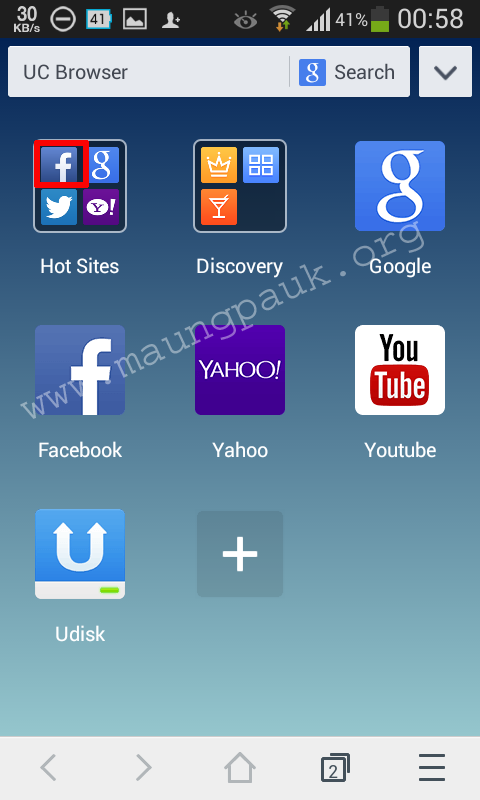
2. UC Browser ကိုဖြင့္ပါ.. သူ႔မွာပါတဲ့ Facebook ကိုႏွိပ္ပါ.

Screenshot_2014-07-30-00-58-06 

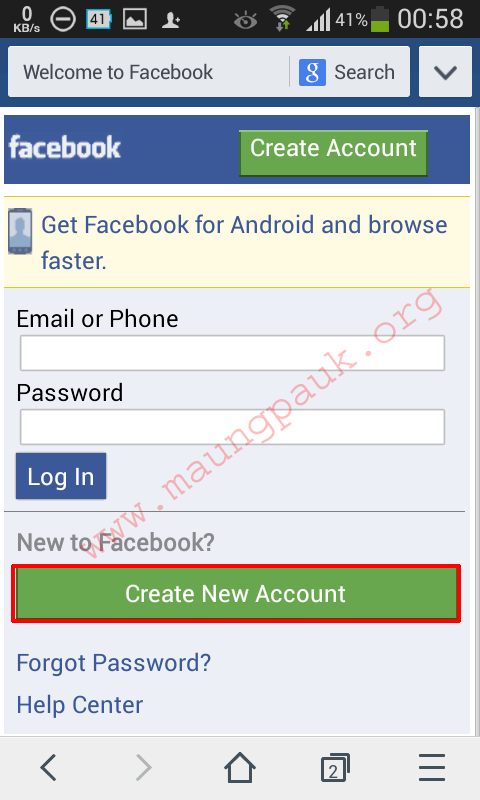
ၿပီးရင္ Create New Account ကိုႏွိပ္ပါ..

Screenshot_2014-07-30-00-58-43

3. ျဖည့္ရမယ့္ အကြက္ေတြထဲမွာ ျဖည့္ပါ.. ဒါကိုေတာ့ အေသးစိတ္ မေျပာေတာ့ပါဘူး.. Email မွာ ခုနက ဖြင့္ထားတဲ့ Email ကို ျဖည့္လိုက္ပါ.. ဆက္ႏွိပ္သြားရင္ေတာ့ confirm code ေတာင္းတဲ့အဆင့္ကို ေရာက္သြားပါမယ္..

Screenshot_2014-07-30-01-13-10

 ဘာမွ မလုပ္ဘဲ ဖုန္းရဲ႕ Home Key ကိုႏွိပ္ၿပီး ထြက္လိုက္ပါ..


4. ခုနက ျပန္ထြက္ထားခဲ့တဲ့ Chrome Browser ကိုဖြင့္လိုက္ပါ.. အီးေမးထဲမွာ Facebook က ပို႔ထားတဲ့ အီးေမးတစ္ေစာင္ ေရာက္ေနပါမယ္.. မေတြ႕ေသးရင္ မ်ဥ္းတို သံုးေခ်ာင္းရဲ႕ ညာဘက္က မ်ဥ္းေကြးေလးကို တစ္ခ်က္ႏွိပ္လိုက္ပါ.. Facebook က အီးေမးကို ေတြ႕ရင္ ႏွိပ္လိုက္ပါ.. အဲဒီမွာ Code 5 လံုး ပို႔ထားတာကို မွတ္လိုက္ပါ.. ၿပီးရင္ Home Key ကိုႏွိပ္ၿပီး ျပန္ထြက္လိုက္ပါ..

Code

5. UC Browser ကိုဖြင့္လိုက္ပါ... Code ျဖည့္ရမယ့္ အကြက္ထဲမွာ ခုနက မွတ္ထားတဲ့ ဂဏန္း ၅ လံုးကိုျဖည့္ၿပီး Confirm ကိုႏွိပ္လုိက္ပါ..


Screenshot_2014-07-30-01-13-48

6. ဒီအဆင့္မွာ Profile Information ျဖည့္ရပါမယ္.. ကၽြန္ေတာ္ ျပထားသလို ျဖည့္လိုက္ပါ.. ဒါက အလြယ္ ေျပာတာပါ.. အကြက္ေတြထဲမွာ ကိုယ္ျဖည့္ခ်င္တာကို ျဖည့္လို႔ရပါတယ္.. Facebook က အသိအမွတ္ျပဳထားတာကိုလိုခ်င္ရင္ေတာ့ ၿမိဳ႕နာမည္၊ ေက်ာင္းနာမည္ေတြကို ေရးၿပီး ညာဘက္က Search ကိုႏွိပ္.. ေပၚလာတဲ့ ၿမိဳ႕၊ ေက်ာင္း ေတြကို ေရြးထည့္ႏိုင္ပါတယ္.. ၿပီးရင္ေတာ့ Save ေပါ့..

Screenshot_2014-07-30-01-15-53
7. ေနာက္တစ္ဆင့္ကေတာ့ Friend ေတြကို Add ေပးရပါမယ္. အနည္းဆံုး Friend 5 ေယာက္ကို Search Box ထဲမွာ ရွာၿပီး Add လိုက္ပါ.. လက္ခံမယ့္သူဆို ပိုအဆင္ေျပပါတယ္.. ၂၄ နာရီအတြင္း ၅ ေယာက္လံုးက Friend အျဖစ္ လက္ခံရင္ ပိုေကာင္းပါတယ္..

Screenshot_2014-07-30-01-16-17

8. ေနာက္အဆင့္ေတြမွာေတာ့ Skip ေတြကိုႏွိပ္ၿပီး ေက်ာ္ႏိုင္ပါၿပီ.. အားလံုးၿပီးသြားရင္ေတာ့ Facebook Account တစ္ခု လြယ္လြယ္ကူကူ ရၿပီးသြားပါၿပီ...


Screenshot_2014-07-30-01-32-33

 Home Key ႏွိပ္ၿပီး ျပန္ထြက္ကာ Facebook Application ဖြင့္ၿပီး ကိုယ့္အေကာင့္ကို Log in ဝင္ႏိုင္ပါၿပီ...
ဒီ Facebook App ထဲမွာလည္း ၿမိဳ႕နာမည္၊ ေက်ာင္းနာမည္ေတြ ေမးပါတယ္.. အေကာင့္လုပ္တုန္းကအတိုင္း ျဖည့္ေပးလိုက္ပါ.. ဒုတိယ အဆင့္နဲ႔ တတိယအဆင့္ကို Skip လုပ္ၿပီး ေက်ာ္လိုက္ပါ.. ဒါဆို သံုးလို႔ရၿပီ.. အစ အဆံုး အေကာင့္ဖြင့္တာ ၁၀ မိနစ္ပဲၾကာပါတယ္.. လိုင္း စုတ္လို႔ ေစာင့္ေနရတာေတာ့ မသိဘူးေႏွာ္...


Screenshot_2014-07-30-03-02-57


Screenshot_2014-07-30-03-03-18


အေကာင့္ရၿပီဆိုၿပီး အားရဝမ္းသာ ျဖစ္မေနခင္ သိထားရမယ့္ စည္းကမ္းေလးေတြ ေျပာျပပါအံုးမယ္..
1. ၂၄ နာရီအတြင္း Friend ၁၀ ေယာက္ထက္ ပိုၿပီး Request မပို႔ပါနဲ႔
2. အေကာင့္သစ္မွာ ပို႔စ္ အနည္းဆံုး ၃ ခု တင္ပါ.. ပို႔စ္မွာ လင့္ေတြ မထည့္ပါနဲ႔အံုး.. ေနာက္ သက္တမ္း ၾကာလာမွ လင့္ေတြပါတဲ့ စာေတြ တင္လို႔ရပါၿပီ..
3. သူမ်ား ေရးထားတာေတြကို အနည္းဆံုး ၅ ခု Like လုပ္ပါ..
4. အေကာင့္သစ္ကို ခု ဖုန္းနဲ႔ သံုး၊ ခဏေန ကြန္ပ်ဴတာနဲ႔သံုး မလုပ္ပါနဲ႔အံုး.. အနည္းဆံုး ၂၄ နာရီေတာ့ ဖုန္းနဲ႔ပဲ သံုးေနလိုက္ပါ...

ဒါဆုိရင္ေတာ့ အဆင္ေျပပါၿပီ.. ဘယ္ေတာ့ ဖုန္းနံပါတ္နဲ႔ ကုဒ္ေတာင္းမလဲဆိုတာ မသိပါဘူး....

ေနာက္တစ္ခုက မိတ္ေဆြေတြကို ေသေသခ်ာခ်ာ ရွင္းျပထားပါလ်က္နဲ႔ Facebook အေကာင့္ေလး ဖြင့္ေပးပါ.. Facebook အေကာင့္ ဝယ္ခ်င္လို႔ပါဆိုၿပီး လာမေျပာပါနဲ႔.. ကၽြန္ေတာ္ အဲဒီဝန္ေဆာင္မႈ မလုပ္ေပးပါခင္ဗ်ာ..

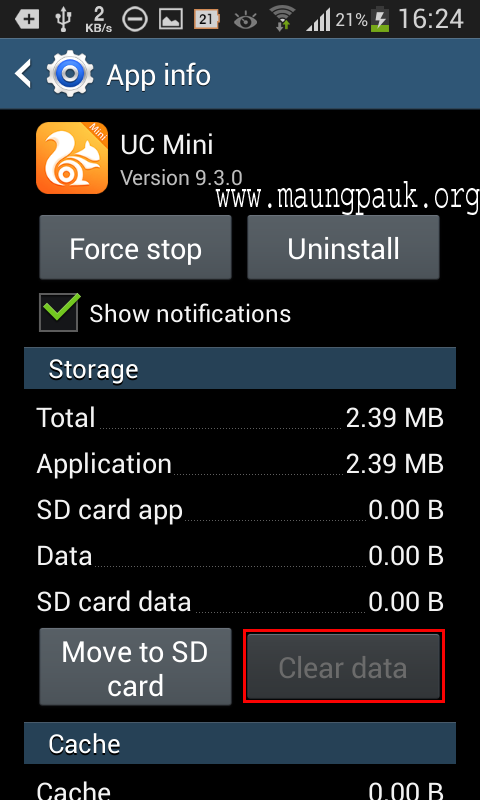
အထက္ပါနည္းအတိုင္း တစ္ေန႔ကို အေရအတြက္အကန္႔အသတ္မရွိ လုပ္ႏိုင္ပါတယ္.. ဖုန္းရဲ႕ Setting> Application> Manage Application သို႔မဟုတ္ Setting> More> Application Manager ကိုႏွိပ္.. Chrome ကိုႏွိပ္.. Clear Data လုပ္.. UC Browser ကိုလည္း Clear Data လုပ္ၿပီး အေကာင့္သစ္ ေနာက္တစ္ခု ထပ္ဖြင့္ႏိုင္ပါတယ္...

Screenshot_2014-07-29-16-23-52


Screenshot_2014-07-29-16-25-00 
Credit to maungpauk.org
Thiha Htike(THT)
0973151297

Hide IP Easy v5.3.3.2 + Patch Full Free Download


http://www.melidownload.com/img/5555555.jpg

Online ေပၚမွာ မိမိေနာက္သို႕ ေျခရာခံျပီး မလိုက္ႏိုင္ေစဖို႕အတြက္ မိမိရဲ႕ IP ေတြကို ေျဖာက္ထားခ်င္သူမ်ား အသံုးျပဳႏိုင္ေအာင္ Hide IP Easy ကိုတင္ေပးလိုက္ပါတယ္ဗ်ာ။ မိမိရဲ႕ IP ကိုေျဖာက္ထားျခင္းအားျဖင့္ မိမိဟာ ဘယ္ေနရာ ဘယ္ႏိုင္ငံ ကေနျပီး အသံုးျပဳေနလည္းဆိုတာ မသိႏိုင္ေတာ့ပါဘူး။ ဒီ Softwareကေတာ့ လူတိုင္း အသံုး၀င္မွာမဟုတ္ပါဘူး။ ဆရာသမားေတြ လိုအပ္ရင္ အလြယ္တကူေဒါင္းယူႏိုင္ေအာင္တင္ေပးလိုက္တာ ပါ။ Internet Explorer, Firefox, Opera, Maxthon, MyIE စတဲ့ Browser ေတြမွာ အလုပ္လုပ္ပါတယ္ဗ်ာ။ အျမဲတမ္းအသံုးျပဳႏိုင္ေအာင္ Full Version အျဖစ္ Patch File ကိုပါတင္ေပးလိုက္ပါတယ္ဗ်ာ။

 **  Step-1.ေအာက္က Download Button ကိုႏွိပ္လိုက္ပါ  
**  Step-2. "5sec". ေလာက္ေစာင္႕ေပးပါ။

**  Step-3. "  << SKIP AD >>   ".ကိုႏွိပ္ေပးပါ။
**  Step-4. Download Link က်လာပါလိမ္႕မယ္။
**  အဆင္ေျပပါေစဗ်ာ။


facebook မွာ အသစ္တင္တိုင္း ဖတ္ခ်င္လွ်င္ေအာက္ကလင့္မွာ like လုပ္ပါ။
Myanmar Tech (အိုင္တီ)
ကြန္ပ်ဴတာနည္းပညာ
အဆင္ေၿပပါေစ။အဆင္ေၿပရင္facebook မွာ like လုပ္ပါအုံး။
အဆင္မေၿပရင္၊လိုအပ္တာရွိရင္ comment ေပါ့။


Google Play မွ download ရယူလုိေသာ App/Game မ်ားကုိ ဒီေနရာမွာ direct link ထုတ္၍ ကြန္ပ်ဴတာကေန download ရယူနုိင္ပါျပီ။


Google Play က app ေတြကုိ ယခုစာမ်က္ႏွာမွတစ္ဆင့္ ဖုန္းမလုိဘဲ app/game မ်ားကုိကြန္ပ်ဴတာထဲသုိ႕ တုိက္ရုိက္ download လုပ္နုိင္ရန္ အလြယ္ဆုံးစီစဥ္ေပးထားပါတယ္။ ေအာက္က Package name or Google Play URL ဆုိတဲ့ Textbox ထဲမွာ ကုိယ္ download ရယူလုိေသာ app ရဲ႕ Google Play link ကုိထည့္ေပးပါ။မိမိရယူလုိေသာ app,game(paid version မ်ားမပါ)ကုိ အဆင္ေျပစြာ ရယူႏုိင္ပါျပီ။
http://apk-dl.com/


facebook မွာ အသစ္တင္တိုင္း ဖတ္ခ်င္လွ်င္ေအာက္ကလင့္မွာ like လုပ္ပါ။
Myanmar Tech (အိုင္တီ)
ကြန္ပ်ဴတာနည္းပညာ
အဆင္ေၿပပါေစ။အဆင္ေၿပရင္facebook မွာ like လုပ္ပါအုံး။
အဆင္မေၿပရင္၊လိုအပ္တာရွိရင္ comment ေပါ့။


4.3.2014ရက္ေန႔ကထြက္ရွိလာတဲ့ Firefox 28.0 Beta 8(25MB)


4.3.2014 ရက္ေန႔ထြက္ရွိလာတဲ့ Firefox 28.0 Beta 8 ကိုတင္ေပးလိုက္ပါတယ္ေနာက္ဆံုးထြက္ကိုသံုးခ်င္သူမ်ားေဒါင္းမွာေဒါင္းယူသြားႏို္င္ပါတယ္ဗ်ာ

Mozilla Firefox is a fast, light and tidy open source web browser. At its public launch in 2004 Mozilla Firefox was the first browser to challenge Microsoft Internet Explorer’s dominance. Since then, Mozilla Firefox has consistently featured in the top 3 most popular browsers globally. The key features that have made Mozilla Firefox so popular are the simple and effective UI, browser speed and strong security capabilities. The browser is particularly popular with developers thanks to its open source development and active community of advanced users.
Easier Browsing
Mozilla put of a lot of resources into creating a simple but effective UI aimed at making browsing quicker and easier. They created the tab structure that has been adopted by most other browsers. In recent years Mozilla has also focused on maximizing browsing area by simplifying toolbar controls to just a Firefox button (which contains settings and options) and back/forward buttons. The URL box features direct Google searching as well as an auto predict/history feature called Awesome Bar. On the right side of the URL box there are bookmarking, history and refresh buttons. To the right of the URL box is a search box which allows you to customize your search engine options. Outside of that a view button controls what you see below the URL. Next to that you have the download history and home buttons.
Speed
Mozilla Firefox boasts impressive page load speeds thanks to the excellent JagerMonkey JavaScript engine. Start up speed and graphics rendering are also among the quickest in the market. Firefox manages complex video and web content using layer-based Direct2D and Driect3D graphics systems. Crash protection ensures only the plugin causing the issue stops working, not the rest of the content being browsed. Reloading the page restarts any affected plugins. The tab system and Awesome Bar have been streamlined to launch/get results very quickly too.
Security
Firefox was the first browser to introduce a private browsing feature which allows you to use the internet more anonymously and securely. History, searches, passwords, downloads, cookies and cached content are all removed on shutdown. Minimizing the chances of another user stealing your identity or finding confidential information. Content security, anti-phishing technology and antivirus/antimalware integration ensures your browsing experience is as safe as possible.
Personalisation & Development
One of the best features of the Firefox UI is customization. Simply right click on the navigation toolbar to customize individual components or just drag and drop items you want to move around. The inbuilt Firefox Add-ons Manager allows you to discover and install add-ons within the browser as well as view ratings, recommendations and descriptions. Thousands of customizable themes allow you to customize the look and feel of your browser. Site authors and developers can create advanced content and applications using Mozilla’s open source platform and enhanced API.

http://www.aungkyawthyu.com/
အဆင္ေျပတယ္ဆိုရင္ ေၾကာ္ျငာေလးကိုတစ္ခ်က္ေလာက္ကလစ္ခဲ့ေပးပါေနာ္ အဆင္မေျပခဲ့တာမ်ားရွိခဲ့ရင္ CBOX တြင္ေျပာၾကာခဲ့ပါေနာ္ ပိုတိုေရွာ့ပံုမ်ားႏွင့္နည္းပညာမ်ားကိုတိုက္ရုိက္ရယူခ်င္တယ္ဆိုရင္  
ဒီမွာFB LIKE ႏွိပ္လိုက္ခဲ့ပါေနာ္ ၃စကၠန္႔အတြင္းကၽြန္ေတာ့္ဆိုဒ္ကေန သင့္ဆီကိုအေရာက္ပို႔လာမည္။  
ကၽြန္ေတာ္ပိုင္ေသာဆိုဒ္မ်ားသို႔လာလည္ႏိုင္ပါတယ္ဖိတ္ေခၚလွ်က္ပါ 
 
Photoshop &Techniques 
 
Full Version Software Android
 
ေဒါင္းနည္းမ်ားမသိပါက ဒီမွာႏွိပ္ျပီး သြားၾကည့္ေပးပါခင္ဗ်ာ

www.myanmartechit.blogspot.com

Myanmar Tech (အိုင္တီ)
ကြန္ပ်ဴတာနည္းပညာ
အဆင္ေၿပပါေစ။အဆင္ေၿပရင္facebook မွာ like လုပ္ပါအုံး။
အဆင္မေၿပရင္၊လိုအပ္တာရွိရင္ comment ေပါ့။


facebook ရဲ ့ photo lock က်ေနသူမ်ားအတြက္ေျဖရွင္းနည္း


facebook photo lock ျပဳတ္ပါျပီ.......facebook မွာ သူငယ္ခ်င္း ေတြရဲ ့ photo ေတြကို ျပျပီး security ေက်ာ္ ေနတာမေအာင္ျမင္တဲ ့သူမ်ားအတြက္ပါ......က်ေနာ္ ့ရဲ ့ lock က်သြားတဲ ့အေကာင္ ့ေလးကို ျပန္လည္ယူျပီးစမ္းသပ္ျပထားပါတယ္ 100 % အဆင္ေျပပါတယ္။
ဘယ္လိုအဆင္ေျပသြားတယ္ဆိုတာေအာက္မွာ video file ေလးပါတြဲတင္ေပးထားပါတယ္။
ၾကိဳးစားၾကည္ ့ခ်င္တယ္ဆိုရင္ေတာ ့ ေအာက္မွာ ဆက္လက္ ရွဴ ့စားေပးပါခင္ဗ်ာ။
မွတ္ခ်က္ 
==============
ဒီနည္းလမ္းကို သံုးမယ္ဆိုရင္ေတာ ့ မိမိတို ့ facebook ဖြင္ ့ခါစက birthday date ကိုမွတ္မိမွအဆင္ေျပပါမယ္။
အရင္ဆံုး facebook ကို ထံုးစံအတိုင္း sin in ဝင္လိုက္ပါ။
your account is tempoary locked ဆိိုတဲ ့ေနရာမွာ continue ကိုနိုပ္ေပးပါ။
ေအာက္မွာျပထားတဲ ့သခ်ၤာကဏန္းေတြနွင္ ့ စာေတြကို အၾကီးအေသးေသေသခ်ာခ်ာရိုက္ထည္ ့ေပးပါ။

 ဒီေနရာမွာ အေပၚက မိမိရဲ ့ေမြးေန ့ကိုထည္ ့ဖို ့အတြက္ provie  your indentity ကို ေရြးျပီး continue ကိုနိုပ္ပါ။


 မိမိ facebook ဖြင္ ့စဥ္အခါက ေမြးေန ့သကၠရာဇ္ ကိုမွန္ကန္ေအာင္ျဖည္ ့ေပးပါ။ျပီးရင္ continue နိုပ္ပါ။


 ဒီေနရာမွာ မိမိအေကာင္ ့ကို ေနာက္ဆံုး login ဝင္ေရာက္ဖို ့ၾကိဳးစားခဲ ့တဲ ့....မွတ္တမ္းေလးကိုေနရာနွင္ ့တစ္ကြ အတိအက်ေဖာ္ျပေပးလာပါလိမ္ ့မယ္....
မွန္ကန္ပါက this was me ကိုနုိပ္ပါ။


ဒီအဆင္ ့မွာေတာ ့အေပၚက this was me ဆိုတာေလးကိုနိုပ္ျပီးတာနွင္ ့မိတ္ေဆြတို ့အေကာင္ ့ကို ျပန္လည္ရယူနိုင္ပါျပီ။ ေအာက္မွာ video file ေလးကိုေဖာ္ျပေပးထားပါတယ္။
video file ေလးကို youtube မွာၾကည္ ့မယ္ဆိုရင္ ဒီမွာ သြားၾကည္ ့ေပးပါ။
အသစ္တင္တိုင္း facebook ကေနဖတ္မယ္ဆိုရင္ ဒီမွာ like လုပ္ေပးထားပါ။
စိုင္းသူ

www.myanmartechit.blogspot.com

Myanmar Tech (အိုင္တီ)
ကြန္ပ်ဴတာနည္းပညာ
အဆင္ေၿပပါေစ။အဆင္ေၿပရင္facebook မွာ like လုပ္ပါအုံး။
အဆင္မေၿပရင္၊လိုအပ္တာရွိရင္ comment ေပါ့။


How To Know Who Blocked You In Google Talk


Whenever you noticed a contact in your Gtalk/Google Talk has not been online for some time, have it ever crossed your mind you’ve been blocked? If you are curious in finding out who actually blocked you in Gtalk, here’s a workaround you can try.


This following method we attempt to show make use of a chat client call Pidgin.


1. Download, Install Pidgin


Click here to download Pidgin chat client. If you already have Pidgin installed, you may skip this step.


2. Configure Pidgin For Gtalk


You’ll probably start with the below screen. Click the Add button. "Accounts -> Manage Account"will also bring you to the same screen. Let’s add Gtalk to Pidgin.


Clicking Add will allow you to add new Gtalk account. The following two screenshots show what you need to fill up for Basic and Advance tab, pay attention to those highlighted.


With all the settings properly entered, you should be able to connect to Gtalk and load your contacts successfully. Now let’s go find out who blocked you.


3. Who’s Blocking You?


When someone blocked you in Gtalk (and other IMs), they appear offline just like your other contacts who are really offline. Right click, click on Get Info, and we’ll see how to differentiate them.


The following image is a comparison of 2 different contacts: Actual offline (left) and Blocked offline (right). If you are blocked, nothing will be display under Buddy Information.


-Galk မွာ ကိုယ့္ကို ဘယ္သူေတြ block လုပ္ထားသလဲ ?

Gtalk မွာ ကိုယ္ မ chat ခ်င္တဲ့/မေက်နပ္တဲ့ သူကို block လုပ္လို႔ရတယ္ဆိုတာ အားလံုးသိၿပီးသား ျဖစ္မွာပါ။ ကိုယ္ block လုပ္ခ်င္တဲ့သူရဲ႕ ID ေပၚမွာ right-click

လုပ္ၿပီး block ကို ေရြးလိုက္ရံုပါပဲ။ ကိုယ့္ဘက္မွာ အဲဒီID ေပ်ာက္သြားၿပီး၊ သူ႔ဘက္မွာေတာ့ ကိုယ္က offline ျဖစ္ေနမွာပါ။ (သူမ်ားကိုသာ block လုပ္ခ်င္တာ...ကိုယ့္ကို block လုပ္တာကိုေတာ့ သိပ္ေက်နပ္တာမဟုတ္ဘူး။ ဟုတ္တယ္မဟုတ္လား..။ ) အဲဒီေတာ့ ကိုယ့္ကို block လုပ္ထား/မထားကို စစ္ၾကည့္လို႔ရပါတယ္။ ပထမဆံုး ကိုယ္သိခ်င္တဲ့သူကို ေရြးပါ..ၿပီး.. 'Send voicemail' button ကိုႏွိပ္ၿပီး call လုပ္လိုက္ပါ။ (သူ႔ကို offline အေနနဲ႔ပဲျမင္ရမွာမို႔ အဲဒီအခ်ိန္မွာ 'Send voicemail' button ပဲေပၚေနမွာပါ။) မိန္းကေလးသံနဲ႔ 'The person you are trying to reach is unavailable. Please leave a message...' ဆိုတဲ့ အသံမ်ိဳး ၾကားရရင္ေတာ့ ကိုယ့္ကို block လုပ္မထားပါဘူး။ တကယ့္ကို offline ျဖစ္ေနတာပါ။ အဲလိုမဟုတ္ပဲ ေခၚလိုက္တာနဲ႔က် က်သြားတယ္၊ ဘာသံမွလည္းမၾကားရဘူးဆိုရင္ေတာ့... စိတ္မေကာင္းပါဘူး...သင့္ကို block လုပ္ထားတာပါ... ကဲ...ကိုယ့္ကို ဘယ္သူေတြ block လုပ္ထားသလဲသိခ်င္ရင္ စမ္းၾကည့္လိုက္ပါလား...။ သိလာပါလိမ္႕မယ္....။
www.myanmartechit.blogspot.com

Myanmar Tech (အိုင္တီ)
ကြန္ပ်ဴတာနည္းပညာ
အဆင္ေၿပပါေစ။အဆင္ေၿပရင္facebook မွာ like လုပ္ပါအုံး။
အဆင္မေၿပရင္၊လိုအပ္တာရွိရင္ comment ေပါ့။


Antamedia Internet Cafe Software 7.5.3 Final (အင္တာနက္ Cafe ဆိုင္ေတြအတြက္)

www.myanmartechit.blogspot.com
အဆင္ေၿပပါေစ။အဆင္ေၿပရင္facebook မွာ like လုပ္ပါအုံး။
အဆင္မေၿပရင္၊လိုအပ္တာရွိရင္ comment ေပါ့။


★★ Salfeld Child Control 2014 14.607 Final + Keygen (23Mb) ★★

ဒီေကာင္ေလးကေတာ့မိမိအိမ္မွာမိသားစု၊ ညီအစ္ကိုေမာင္ႏွမႏွင့္ကေလးေတြအတြက္လံုျခံဳေရးဆိုင္ရာ
Internet Remote Control ေဆာ့စ္၀ဲတစ္ခုျဖစ္ပါတယ္။programs ေတြကိုအျခားလူသံုးစြဲခြင့္မရေအာင္
ပိတ္ထားလို႔ရပါတယ္။computer ႏွင့္ Internet သံုးစြဲတဲ့အခ်ိန္ေတြကို day and the week ကန္႔သက္ခ်က္
ျဖင့္ပိတ္ထားလို႔ရပါတယ္။videos and online games ေတြကိုလည္းရက္အကန္႔အသက္နဲ႔ပိတ္ထားလို႔ရပါ
တယ္။applications, learning tools,ႏွင့္ အင္တာနက္ modem, networks, DSL, routers, အပါအ၀င္
import or export settings or blacklists ႏွင့္ Send log files အျခား email address ကအစပတ္စပိုစ္႕
နံပါတ္ျဖင့္ေသာ္လည္းပိတ္ထားလို႔ရပါတယ္။အျခားေသာလုပ္ေဆာင္ခ်က္ေတြကိုေအာက္မွဖတ္ၾကည့္ပါ။
ဖိုင္ဆိုဒ္ကေတာ့ 23Mb ပဲရွိပါတယ္။


Computers are the place for children. This is the place where they can sharpen their agility as well as their abilities. They can learn and make new friends. What's more, the Internet provides information for homework assignments. So far, so good. But they also need to be protected from the computer-for one thing, so that they don't lose their sense of time and forget to go out and play with their friends once in a while, and for another, because of the dangers lurking on the Web.

That's why responsible parents everywhere install Child Control on every computer that their children use.New! Internet Remote Control: Starting with Child Control 2009 you can modify the most important settings or view session logs directly on the Internet. No matter where you are. No matter which browser you are using. This feature is part of the Online Functions.

Just a few things Child Control lets you do:
* NEW: Blocking of file sharing programs and sites
* NEW: 1,000,000 undesirable sites can now be selected for restriction
* NEW: Adult-content filtering provided by German government authorities
* NEW: Email reports of on- and off-times and daily statistics
* NEW: additional configuration options
* Works with all versions of Windows from 95 to Vista
* Limit time on the computer for each day of the week
* Limit use of the Internet for the day and the week
* Set PC off-limits times (e.g. after 11 p.m.)
* Set Internet off-limits times (e.g. after 11 p.m.)
* Easily extend time with passwords or TAN's
* Define "unwelcome" web content using keywords
* Set time limits for categories of websites, such as videos and online games
* Set specific time limits for each computer application
* Grant unlimited time for specific applications, such as learning tools
* Log all computer activity to let you later review each user's activities
* Block modifications to major Windows settings
* Protect your data by blocking access to specific folders
* Limit children's access to specific programs
* Disable "backdoor" access to programs or functions
* Extend all time limits during vacation time-one click does it all
* Set up a central database for multiple users (schools, institutions, etc.)
* for computers connected by modem, networks, DSL, routers, etc.
* Easily import or export settings or blacklists
* Send log files to any email address


က်ြန္ေတာ္တင္သမွ်ပိုစ့္ေတြ Facebook ကေနရယူခ်င္တယ္ဆိုရင္  ဒီမွာ Like ႏွိပ္ပါ။
မန္ဘာ၀င္ခဲ့ျခင္းျဖင့္ ပိုစ့္အသစ္တင္တိုင္း မိမိ Gmail ထဲကိုတိုက္ရိုက္ေရာက္ရွိမည္ျဖစ္ပါသည္။
ထို႔ေၾကာင့္မန္ဘာ၀င္ခဲ့ဖို႔ဖိတ္ေခၚပါတယ္။

Thank You For Downloading And Dont Forget to Clicking Once on a Ad Banner.
အဆင္ေျပတယ္္ဆိုရင္ေတာ့ေၾကာ္ျငာမ်ားကို (တစ္ေန႔မွ) တစ္ၾကိမ္ေလာက္သာ ကလစ္ခဲ့ပါခင္ဗ်ာ။


http://mm-knowledgeinfo.blogspot.com/2014/02/inpixio-photo-filters-and-effects.html 


★★နည္းပညာၿမိဳ႕ေတာ္★★


www.myanmartechit.blogspot.com
အဆင္ေၿပပါေစ။အဆင္ေၿပရင္facebook မွာ like လုပ္ပါအုံး။
အဆင္မေၿပရင္၊လိုအပ္တာရွိရင္ comment ေပါ့။

ဘယ္ေလာက္ေဝးေဝး တစ္ေယာက္နဲ႔တစ္ေယာက္ မ်က္ႏွာခ်င္းဆိုင္ တိုက္ရိုက္ျမင္ေတြ႕ရေစမယ့္ Tango

Tango ဆိုတဲ့ software ကို အသံုးျပဳသူ သိပ္မေတြ႕ရဘူးဗ်.. Viber တို႔လို အသံုးမမ်ားေပမယ့္ ဒီေကာင္ရဲ႕ Live Video Message ေၾကာင့္ ႏိုင္ငံရပ္ျခားက မိတ္ေဆြေတြနဲ႔ မ်က္ႏွာခ်င္းဆိုင္ စကားေျပာလို႔ရတယ္.. Viber လို Message လည္းပို႔လို႔ရတယ္.. လိုင္းလည္း သိပ္မလိုသလို Windows ကြန္ပ်ဴတာ, Windows Phone, Android Phone ေတြမွာ Install လုပ္ၿပီးအသံုးျပဳႏိုင္တာေၾကာင့္အသံုးျပဳသင့္တဲ့ Social App တစ္ခုျဖစ္ပါတယ္...


အဆင္ေျပပါေစ..

ေမာင္ေပါက္< Knowledge Note >
www.maungpauk.org


Download :  MB
For Android
For Windows Computer
www.myanmartechit.blogspot.com
အဆင္ေၿပပါေစ။အဆင္ေၿပရင္facebook မွာ like လုပ္ပါအုံး။
အဆင္မေၿပရင္၊လိုအပ္တာရွိရင္ comment ေပါ့။